
Free Calculator

Digital Volume & Bit-Depth Loss Calculator

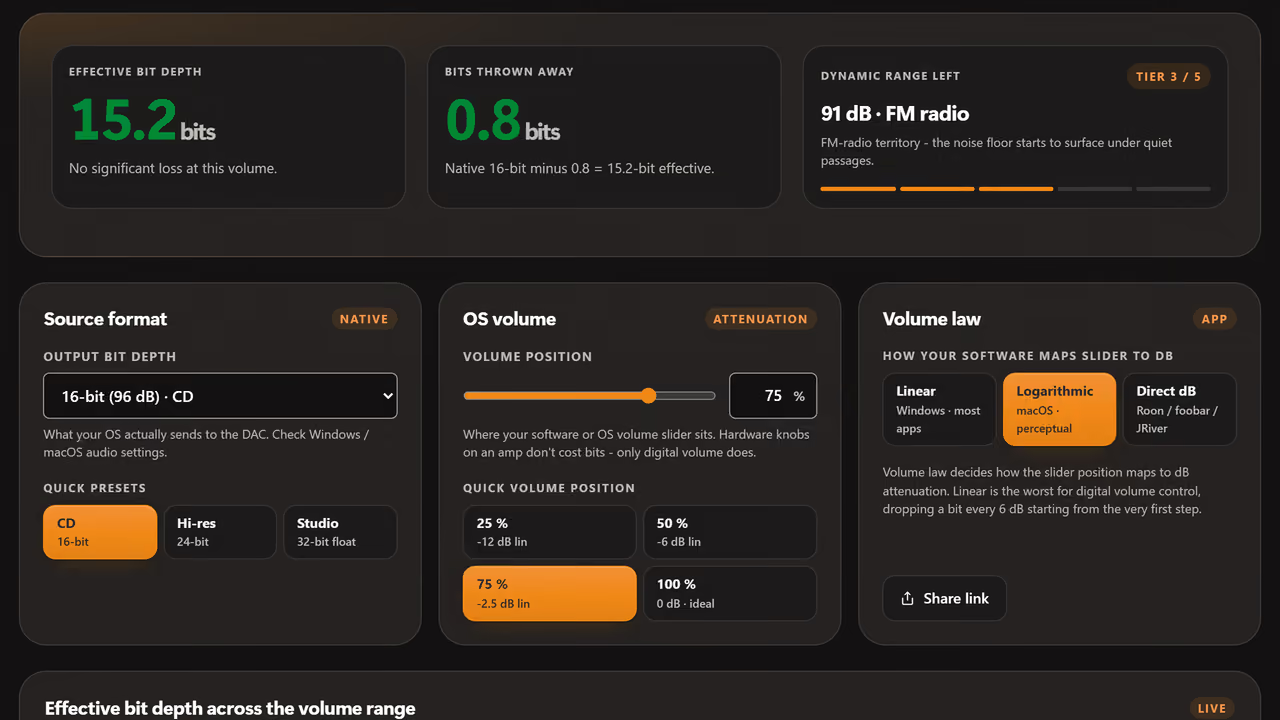
Every step down in OS digital volume costs audio resolution. At 16-bit output, just 6 dB of attenuation throws away an entire bit. Find out how much of your dynamic range is being sacrificed and at what point the noise floor starts to climb above music level.

Quick truth: at 50% Windows volume on a 16-bit DAC output, you are listening to roughly 13-bit audio. At 25% you are at 11 bits - barely better than a 12-bit cassette. The fix is 24-bit OS output and analog volume control.

Set this to what your OS actually sends to the DAC - check audio settings.

%

macOS uses log. Windows is linear. Roon, JRiver, foobar2000 use direct dB.

Why digital volume control degrades audio quality

Bits and dynamic range

Each bit of digital audio adds approximately 6.02 dB of dynamic range. A 16-bit file has 96 dB of theoretical range; a 24-bit file has 144 dB - more than the human ear can resolve in a single moment.

When you attenuate digitally by 6 dB, you effectively discard the least significant bit. At −12 dB you lose two bits. At −48 dB you have thrown away 8 bits - taking a 16-bit signal down to 8-bit quality. The noise floor rises with every step.

The fix

Use 24-bit or 32-bit output mode at the OS level and keep the digital volume at 100%. Control loudness at the analog stage - the amplifier's volume knob, the preamp, or a DAC with a hardware volume control.

With 24-bit OS output, you can attenuate digitally by 48 dB and still have 16-bit quality remaining. Many high-end DACs implement volume in the analog domain for exactly this reason. If your DAC has a volume knob, use it.
Bit depth, dynamic range, and what it costs you

Each bit is worth ~6.02 dB of dynamic range. Drop a bit and the noise floor rises 6 dB. The "audibility floor" column shows where the residual noise starts to surface above the music's lowest passages.

FormatBitsDynamic rangeAudibility floor
Telephone, voicemail848 dBHiss audible on every quiet passage.
Compact cassette~12~72 dBTape hiss; classical pp passages disappear into noise.
FM radio~13~78 dBAudible noise floor under quiet music.
16-bit CD (Red Book)1696 dBBelow threshold of hearing in a quiet room. Dither can lift effective range to ~120 dB.
16-bit at 50% Windows volume~13 effective~78 dBEqual to FM radio quality.
16-bit at 25% Windows volume~11 effective~66 dBWorse than cassette. Hiss audible.
20-bit DAT, early hi-res20120 dBBeyond any room's noise floor.
24-bit hi-res / studio master24144 dBBeyond physiological hearing limit.
32-bit float (modern DAW internal)32 fp~1500 dBHeadroom equivalent of "the entire universe is too quiet."

FAQ

Digital volume and bit-depth FAQ.

Why digital attenuation costs resolution, how much is too much, and what to do instead - analog volume, 24-bit output, and the quiet music problem.

  1. Why does digital volume reduction lose audio resolution?

    Digital volume scales every sample by a fraction less than 1, which truncates the low bits. At -6 dB attenuation you lose 1 bit of resolution; at -24 dB you lose 4 bits. A 24-bit file at -24 dB attenuation effectively becomes 20-bit. The calculator shows exactly how many bits you keep at any volume setting.

  2. How much digital volume reduction is too much?

    For 16-bit content (CD-quality), keep digital attenuation below 12 dB to avoid audible quantization noise rise. For 24-bit content, you can attenuate 30-40 dB before degradation matters. Better practice: set your DAC or amp gain to match the loudest peak you ever play and keep digital volume near 0 dBFS.

  3. What is bit depth in audio?

    Bit depth is the number of bits per audio sample. 16-bit gives 96 dB of dynamic range and is the CD standard. 24-bit gives 144 dB - more than human hearing can resolve, useful as headroom during mixing. The actual recorded music rarely uses more than 60-70 dB of dynamic range; bit depth is mostly about quiet-detail noise floor.

  4. Does Windows or macOS volume reduce bit depth?

    Yes, when the system mixer is in the path. macOS Core Audio and Windows shared mode apply digital attenuation that loses bits per the calculator. To avoid this, use exclusive mode (Windows WASAPI exclusive, macOS bypass via apps like Audirvana or Roon) or hardware volume on the amp/DAC.